Control Your WordPress with Claude
Not ready to leave WordPress? You don't have to. Connect Claude to your existing site and manage content, plugins, SEO, and your WooCommerce store through natural language — no migration, no disruption. Building pages with Elementor? There's a route for that too: Claude Code + Elementor.
Claude integrates with WordPress via the REST API and WooCommerce REST API. Natural language maps to authenticated API calls — GET /wp/v2/posts, PUT /wc/v3/products/{id} — all from a single conversation thread. No plugin required on the WP side.
We're advocates of Claude CMS — but we get it
We believe Claude CMS is the best way to build a website from scratch. No plugins, no themes, no overhead — just Claude building exactly what you need on your own server for £6.99/month.
But if you've spent years building your WordPress site, if your team knows the dashboard, if your plugins are embedded in your workflow — we understand you may not want to make the jump right now. That's completely valid.
The good news: Claude works seamlessly alongside your existing WordPress. You keep everything you've built, and gain an AI layer that controls it through conversation.
Claude CMS is Claude + MCP tools writing directly to a PHP/MySQL server. The same principle extends to WordPress: Claude + WordPress REST API + WooCommerce REST API = full conversational control of any existing WP installation. No data migration. No downtime.
Everything your WordPress needs — through conversation
From writing and publishing posts to managing your WooCommerce store, Claude handles it all through natural language. No clicking through menus, no hunting for settings, no plugin to buy.
Claude maps natural language to WordPress REST API endpoints. Each operation is an authenticated HTTP call — create, read, update, delete — executed directly against your WP installation via Application Password credentials.
Content management
Write new posts and pages, update existing content, change categories and tags, schedule publications, and manage drafts — all by describing what you want to Claude.
POST /wp/v2/posts, PUT /wp/v2/pages/{id}, PATCH status fields. Supports custom post types, ACF field updates via the meta endpoint, and bulk status changes across post sets matching a query.
SEO & meta management
Update page titles, meta descriptions, and Open Graph tags across your site. Ask Claude to audit your top pages for missing meta and fix them all in one go — no Yoast dashboard needed.
Yoast SEO, Rank Math, and All in One SEO expose meta via post meta fields (e.g. _yoast_wpseo_title, _yoast_wpseo_metadesc). Claude updates these via the REST meta endpoint. Bulk updates via paginated GET + batched PUT.
WooCommerce products
Add new products, update prices and descriptions, manage stock levels, create product variations, and organise categories — by talking to Claude instead of clicking through WooCommerce.
GET/POST/PUT /wc/v3/products. Supports variable products with full variation matrix, product meta, gallery image IDs, and stock_quantity management. Batch API handles up to 100 items per request.
Order management
Check new orders, update fulfilment status, process refunds, send customer notes, and pull order reports — all without opening the WooCommerce Orders screen.
GET /wc/v3/orders with status/date/customer filters. PUT for status transitions. POST /orders/{id}/notes for customer comms. Full and partial refunds via the /refunds sub-endpoint.
Plugin management
Check which plugins need updates, activate or deactivate plugins, adjust settings, and troubleshoot conflicts — without navigating the WordPress admin panel.
GET /wp/v2/plugins (WP 5.5+). PUT /wp/v2/plugins/{plugin} for activate/deactivate/update operations. Plugin-specific settings accessible via their own REST namespaces or the options API via a lightweight custom endpoint.
Bulk operations & automation
Run operations at scale that would take hours manually — update 200 product descriptions, add schema markup to 50 posts, or fix broken links across your entire site.
Claude chains REST calls in a paginated loop — GET all items matching a filter, then batched PATCH/PUT. WooCommerce Batch API (/wc/v3/products/batch) handles up to 100 items per request natively.
We set it up — you just ask
You don't configure anything inside WordPress. We build the connection, test it against your site, and hand you an account where it is already working — with every other connector unlocked alongside it.
We provision the scoped credentials, register WordPress REST and WooCommerce REST as MCP tool endpoints, and verify read/write against your install before handover. Secrets stay server-side — you never handle an API key.
We build the connection
Tell us your site address. We authorise the connection against WordPress and WooCommerce and check every operation works before it reaches you. Nothing to install, nothing to configure.
We issue per-app credentials scoped to the role you approve, bind them to the connector, and run a read/write verification pass across posts, media, products and orders. Rotation and re-authorisation are handled by us.
It's live in your account
Sign in to your Claude CMS account and the WordPress connection is already there under Connections — ready to query your posts, products and orders straight away.
The connector is bound to your Claude CMS account and reachable from the Claude apps and Claude Code alike. Tool calls become authenticated REST requests — no headers, tokens or curl on your side.
Control by conversation
Tell Claude what you need. "Write a blog post about our summer sale and publish it." "Update all wool product prices to £24.99." Claude handles the rest.
Natural language intent maps to REST verb + endpoint + body construction. Claude handles pagination, error handling, and response parsing — returning a plain-language confirmation of every operation.
Install it yourself, decide what Claude may touch, see every change
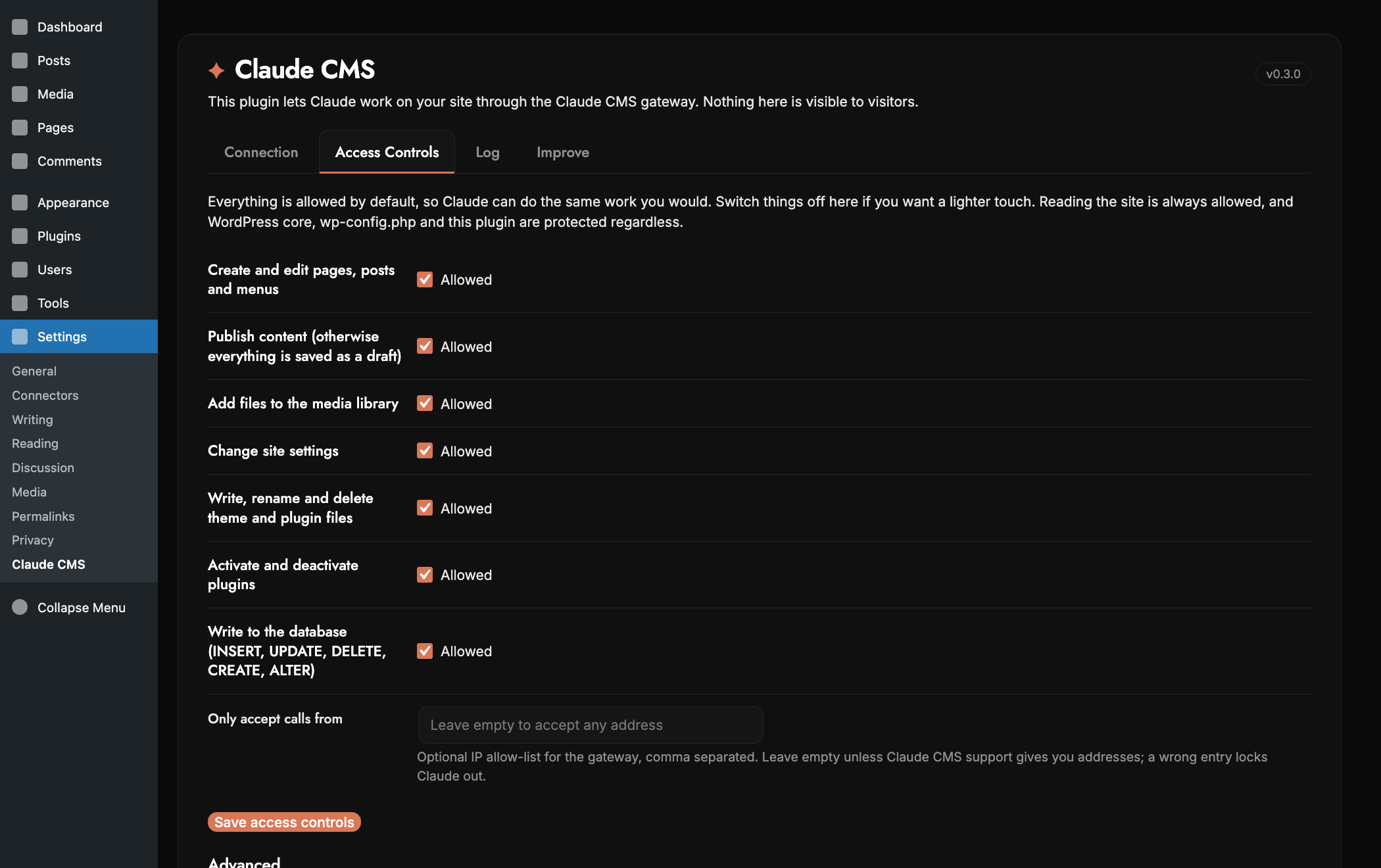
The WordPress connector is now a plugin you install from your own dashboard. It connects with a one-time code from your Claude CMS account, gives you switches for what Claude is allowed to do, and keeps a log of every call so you can see exactly what happened and when.
A single plugin zip, uploaded through Plugins → Add New. It registers itself with the Claude CMS gateway using a one-time registration token, advertises WordPress-native tools (posts, menus, settings, files with backups, guarded SQL, media, plugins, cache) and enforces capability switches server-side. The call log lives in its own table with configurable retention.
Install and connect in minutes
Download the plugin from your Getting Started page, upload it in WordPress, and paste a connection code. The code is shown once, works for one site and expires. No FTP, no folders, no credentials to send anyone.
The plugin's Connect step exchanges a one-time registration token for a gateway connection under your account. Authorization-header pass-through is handled automatically on Apache-behind-nginx hosts.
Access controls
Everything is allowed by default, so Claude can do the same work you would. Prefer a lighter touch? Switch off publishing so Claude only drafts, block file edits, plugin changes or database writes, and restrict which addresses may call the site. Reading is always allowed.
Seven capability switches enforced at dispatch: content_write, publish, media, settings_write, files_write, plugins, db_write. Publish-off downgrades to draft with a warning; db_write-off keeps SELECT working. Optional IP allow-list. WordPress core, wp-config.php and the plugin itself are always read-only.
Audit log
Every call Claude makes is recorded on your site: what it did, to which page or file, whether it worked, how long it took and where it came from. Kept for 24 hours by default, or three or six months if you prefer, then cleared automatically.
Own table, pruned on writes and daily by WP-Cron, hard ceiling of 20,000 rows. Retention 24h / 3m / 6m from the Log tab. Nothing leaves your site.
Claude with WordPress today — Claude CMS when you're ready
Using Claude alongside your WordPress is a great starting point. You immediately gain an AI layer over everything you've already built — without disrupting your team, your content, or your workflows.
When you're ready to take the next step — a new site, a new product, a fresh project — Claude CMS builds it from scratch. Faster, lighter, no plugin overhead. Many users run both: WordPress for their established site, Claude CMS for new ventures.
Claude for WordPress (now)
- ✓ Keep your existing site and all its content
- ✓ Control WordPress through conversation
- ✓ AI-powered WooCommerce management
- ✓ No migration or disruption
- ✓ Set up and supported by us
Claude CMS (when you're ready)
- ✓ Claude builds your new site from scratch
- ✓ No plugins, no theme overhead
- ✓ Fully bespoke design & features
- ✓ Pages load faster (<50KB vs 300KB–2MB+)
- ✓ £6.99/month flat — no add-ons
What you can ask for on WordPress
Posts, pages, media and WooCommerce — described in the chat, done on your site.
Posts & pages
Write, edit and publish posts and pages, with categories, tags and featured images set for you.
ContentMedia library
Add images to the library and place them into a gallery, a page section or a post, sized correctly.
MediaWooCommerce products
Create and update products, prices, stock levels and variations without opening the dashboard.
CommercePublishing rhythm
Keep the blog moving on a schedule — drafted, illustrated and queued without you starting it.
AutomationClaude and WordPress — common questions
How do I connect Claude to WordPress?
You do not have to. We build the connection for you: tell us your site address and we authorise it against WordPress and WooCommerce, test it, and it appears in your Claude CMS account under Connections ready to use. You never install a plugin or generate an API key yourself.
Do I have to set it up myself?
No. Setup is something we do, not a task we hand you. We provision the credentials, verify read and write access across your posts, media, products and orders, and support the connection from there. The same account then unlocks every other connector we build.
Does Claude need a WordPress plugin?
No. The connector does not require you to install a plugin on your WordPress site, so there is nothing extra to keep updated and nothing new to break at the WordPress end.
What can Claude change on my WordPress site?
Posts, pages, categories, tags and media, plus WooCommerce products, prices, stock and variations. It can also work with theme files where you allow it.
Does it work with Claude Code?
Yes. The same connector is reachable from Claude Code as well as the Claude apps, so you can drive your WordPress site from whichever you already use.
Do I have to migrate away from WordPress?
No. The connector is for controlling the WordPress site you already have. Claude CMS is there if you later want a site with no plugins to maintain, but nothing forces the move.
Get the WordPress connector for just £6.99/month
Your Claude CMS licence isn't per-integration — one subscription unlocks the WordPress & WooCommerce connector and everything below. No add-ons, no per-connector fees.
- ✓Every other connector — Wix, Shopify, Framer, Elementor, LinkedIn & more
- ✓Full Claude CMS — pages, blog, forms, database & backend
- ✓All building blocks, plus every new connector as it launches
- ✓Cancel anytime · no long contracts · your site stays yours
Need the Setup & Monthly or Full Build + SEO/AEO plan instead? Compare all plans →
Start controlling your WordPress with Claude today
We connect Claude to the WordPress site you already have, set it up for you, and support it from there — no migration, no disruption.
WordPress REST API + WooCommerce REST API + Claude MCP. Application Password auth. Full read/write access from day one. Upgrade to a native Claude CMS build whenever you're ready.
If it has an API, we’ll build the connection
Every other platform answers this question with “is there an app for that?” We answer it by writing the connection. There is no app store here, so nothing has to be popular enough for someone else to build it first, and there is no extra subscription at the end of it.
Your site is your own PHP/MySQL, not a sandbox, so an integration is ordinary server code against the vendor’s API rather than whatever a marketplace app is permitted to reach. Credentials are deposited encrypted in your account area and used server-side only.
Anything with a documented API
Accounting, inventory, CRM, booking, couriers, marketplaces, your own internal system. If it publishes an API, it can be connected.
Built for your workflow
Not the generic version that suits a hundred thousand shops. The one that matches how you actually work, because it is written for you.
No app store, no app bill
Connections come with your plan. No per-app subscription stacking up month after month, and no revenue share on your sales.
Early customers keep this. Connections are included on your plan for as long as you stay on it. If we ever charge separately for them, it will not be for the people who backed us early — you keep what you signed up for.
Tell us the tool and what you need it to do. If it genuinely cannot be done — no API, or the vendor does not allow it — we will say so rather than sell you a workaround.