The Content Management System Claude Works Inside
Claude builds and edits your website by conversation. Switch the CMS on and every one of those edits is kept on the record — who changed what, when, and why, whether it was Claude, a member of your team, or a script. It is off until you want it, and it scales with your content when you do.
An opt-in, revision-tracked content store behind the MCP connector. Database triggers capture every write, so edits from the dashboard, from Claude, and from raw SQL all land in one attributed history. Compressed snapshots, per-field change tracking, line-by-line diffs, restore to any revision, typed custom fields and a publish gate.
A real backend, sitting behind the conversation
Most AI website tools give you a chat box and hope for the best. Claude CMS gives you the chat box and the filing cabinet: one list of every page and post on your site, each one openable, comparable and restorable.
Pages reads and writes the same rows your site renders from — no shadow copy, no sync job, no export format. The dashboard and the MCP connector are two doors into one content store.
Every page and post
One list of everything on the site. Filter by type, by status, by who made the change, or search it. Click a row to open it.
Filters on type, status and change source (dashboard, Claude, direct SQL), plus free-text search. The whole list downloads as CSV.
A full change history
Every edit is kept as a revision you can view, compare and restore. Made here, made by Claude, or made straight into the database — it is all recorded.
Revisions are captured by database triggers, not application code, so a write that bypasses the app is still attributed and still reversible.
Fields you define
Add an author, a hero image, a publication date — whatever your content needs. The fields appear on the edit form, and Claude can read and set them too.
Typed custom fields with a key, label, default and scope. Eight types: text, textarea, number, date, select, image, boolean and URL.
There when you need it, absent when you don’t
You can already tell Claude to create and manage your pages, and none of this needs switching on for that. The CMS is for when a website stops being a side project: more than one person touching it, a client who asks what changed, a regulator, or simply too much content to hold in your head.
Setup is explicit, one-shot and idempotent. Until it runs, no tables are created, no triggers exist and the dashboard is strictly read-only against your site.
Nothing runs until you ask
A site with no revision history can be looked at but not edited here, and nothing is added to your database. No background jobs, no schema changes, no overhead on a site that does not want any of it.
One press to switch on
“Set up Pages for this site” installs the revision tables, the triggers and a baseline of everything you already have, and brings your site’s connector up to date in the same press.
Tracked from change one
Because the connector is updated at the same time, edits are attributed correctly from the very first one — not from whenever you got round to configuring something.
Know who changed what — and put it back
The reason people hesitate to let an assistant near their website is the fear of a silent change they only notice weeks later. This is the answer to that: a permanent record of every edit, attributed to whoever made it, with a one-click way back.
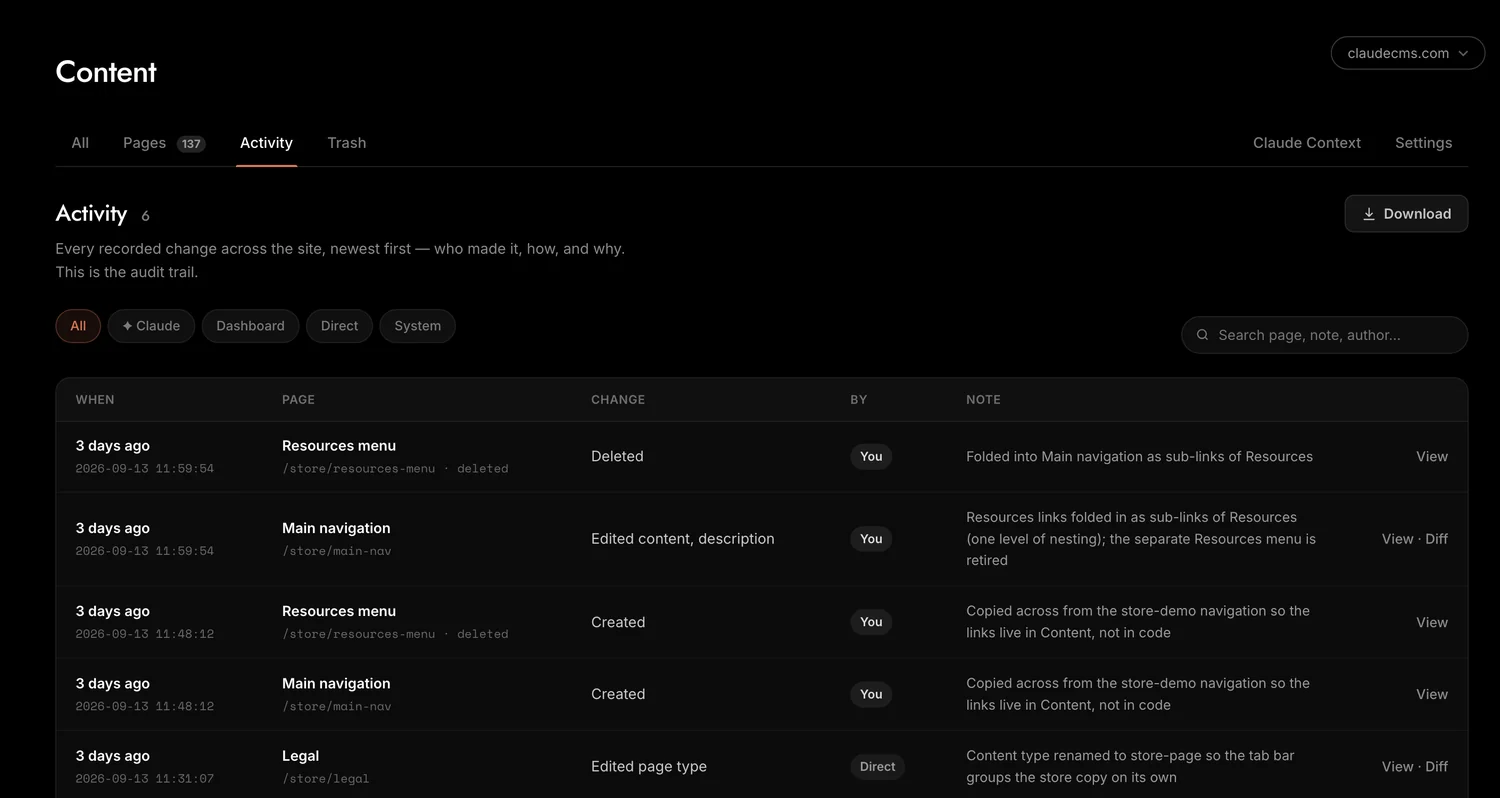
Every revision carries an actor, a source, a client and an optional note, written by database triggers from session variables the writer sets. Nothing that touches the table escapes it.
Tracked to the person
A save from the dashboard is recorded against the email address of whoever was signed in. Claude’s edits are recorded as Claude’s, and a write made straight into the database is recorded as exactly that. Three kinds of author, never confused with each other.
Every change, however it was made
Because the recording happens in the database rather than in application code, there is no back door that skips the log. Each revision also notes which fields actually changed, so you can scan a history without opening every entry.
Compare any two revisions
Line by line: red was removed, green was added. Settings and custom fields that differ are listed first, so a change to the slug or the status is impossible to miss.
Restore in one click
Found the version you wanted? Restore it. The restore is itself recorded, and remembers which revision it came from, so the history stays honest about what happened and when.
Built for sites with a lot to keep track of
A handful of pages needs no system at all. Hundreds of pages, years of edits and several people making them is a different problem, and it is the one this was designed around.
History is stored as compressed snapshots with retention you set, and the activity feed is indexed for the query it actually runs. It sits in your own MySQL, so capacity is your server’s, not a vendor’s plan.
History that stays small
Each revision is a complete snapshot, stored compressed — on this site that turns megabytes of page history into a few hundred kilobytes, around a third of the raw size. Keeping the record does not mean paying for it forever.
Limits you set
Choose how many revisions to keep per page and how long deleted pages stay recoverable. The history grows the way you decided it should, not the way the software felt like.
No ceiling you did not choose
It is your own database on your own hosting. No row limits, no API quotas, no per-seat pricing, and the whole list exports to CSV whenever you want it somewhere else.
Decide what Claude may publish
Claude can be trusted with the work and still be kept on a short leash about what goes live. These settings are how you draw that line, and the line itself is part of the record.
Publishing policy is expressed as a directive the connector hands Claude, alongside defaults applied to anything it creates.
The publish gate
Turn it on and Claude is told to ask you to publish from the dashboard rather than publishing itself. The publish step becomes something a named person did, recorded in the audit trail, instead of something that happened quietly.
Required change notes
Insist on a short note explaining every save. The note is stored with the revision and shown in the activity feed, so six months later the history still says why, not just what.
Defaults for new content
Choose what Claude creates by default and the status it starts in — a new post that lands as a draft under the right parent, with the meta description already set, needs far less tidying up.
Claude Context
Write standing instructions for how your content should be handled — tone, house style, what never to touch. Claude reads them before it works on your site, every time.
Content with a shape, not just a blob of HTML
Pages, posts and landing pages come as standard, and you can invent your own types. Add the fields your content actually has, and both you and Claude can work with them properly.
Content types are open, not enumerated: define one and it appears in the menu bar as soon as something of that type is saved. Custom fields are scoped per type and exposed to the connector.
Types that fit your site
Pages, posts and landing pages to begin with. Need case studies, recipes or venues? Make the type and start writing.
Custom fields
Key, label, type, choices, default and sort order. They render on the edit form and Claude can populate them — ask it to set an author on forty posts and it will.
A trash that remembers
Deleted pages are restorable with their history intact, and the deletion is recorded like any other change.
One page, every country you sell to
Tick the countries your site serves and any page can have a version for each of them, at its own address. The backend shows them as one page with a pill per country, so nothing has to be hunted for. The list of countries we support keeps growing.
Locale versions are derived from the page address, not configured per page: enable locales once in Settings and the backend folds each locale group into a single row with a pill per country. hreflang alternates are generated from the same data. New locales are added over time with nothing to change on your side.
Tick the countries
Choose the countries you serve once, in Settings. Add more whenever you expand, and the rest follows.
One page, several versions
A country version starts as a draft copy at that country’s address. You, or Claude on request, then make it local — language, prices, examples.
Found by the right people
Search engines are told which version belongs to which country automatically, and visitors land on the one meant for them.
One CMS, described four ways
The content management system is the backend of Claude CMS. Depending on what brought you here, these may be the more useful door in.
An AI-native CMS
Built for an assistant to operate directly, rather than a traditional CMS with a chat feature bolted on the side.
What makes it AI-native →A headless CMS
Your content in your own database, reachable over an API, with no per-seat pricing and no request limits.
Use it headless →Self-hosted
PHP and MySQL on your own server. You hold the data, the backups and the keys.
Host it yourself →Built on MCP
Every page, file and database operation is a Model Context Protocol tool, which is why Claude can do real work rather than suggest it.
How the connector works →Also worth a look: the full feature list, how it works end to end, adding a blog, and the building blocks library.
The Claude CMS backend — common questions
Does Claude CMS have a backend content management system?
Yes. Pages is the backend: every page and post on your site in one list, with a full history of who changed what. You can open any page, edit it, compare revisions and restore an earlier one. You can also carry on simply telling Claude what to change, and Pages records those edits too.
Is the content management system on by default?
No. It is off until you switch it on, and a site that never switches it on is completely unaffected: no extra tables, no triggers, no background jobs. Claude can still build and manage your pages without it. Turn it on when the site outgrows working from memory, which usually means more people editing, a client or auditor asking what changed, or simply more content than one person can hold in their head.
Can I see which person made a change?
Yes. A save made in the dashboard is recorded against the email address of whoever was signed in. Edits made by Claude are recorded as Claude, and a write made straight into the database is recorded as a direct change. Each revision also notes which fields actually changed, so you can scan a history without opening every entry.
Where do my pages actually live?
In your own site database, on your own hosting. Pages reads and writes the same records your website renders from, so there is no second copy to keep in sync and nothing to export if you ever move.
Can I see what Claude changed on my website?
Yes. The Activity view lists every recorded change across the site, newest first, showing who made it, how it was made and why. Changes made in the dashboard, changes made by Claude and changes made straight into the database all land in the same trail.
Can I undo something Claude changed?
Yes. Every change is kept as a revision. Open the page, compare any two revisions line by line, where red was removed and green was added, then restore the one you want. Settings and custom fields that differ are listed first, so a structural change is obvious at a glance. The restore is itself recorded, and remembers which revision it came from.
How much content and history can it handle?
It runs on your own MySQL database, so capacity is your server rather than a plan tier: no row limits, no API quotas and no per-seat pricing. Every revision is a complete snapshot stored compressed, which on our own site holds megabytes of page history in a few hundred kilobytes. You also set how many revisions to keep per page and how long deleted pages stay recoverable, so the history grows the way you decided it should.
Can I stop Claude publishing pages without my approval?
Yes. Turn on the publish gate and Claude is told to ask you to publish from the dashboard rather than publishing itself. That makes the publish step something a named person did, recorded in the audit trail, instead of something that happens quietly.
What are custom fields for?
Extra structured data on a page or post, such as an author, a hero image or a date. You define the key, the label and the type, choosing from text, longer text, number, date, a list of choices, image, true or false, and URL. They appear on the edit form, and Claude can read and set them too.
Does switching it on change my existing website?
Nothing is installed silently. A site with no revision history is read-only in Pages until you press Set up Pages for this site. That one press installs the revision tables, the triggers and a baseline of everything you already have, and brings the site connector up to date, so edits are attributed from the first change onwards.
What happens to a page I delete?
It goes to Trash and can be restored together with its history, and the deletion is recorded like any other change. You choose how long deleted pages are kept.
Can I require a reason for every edit?
Yes. Turn on the change note requirement in Settings and every save has to carry a short note saying why. The note is stored with the revision and shown in the audit trail.
Let Claude do the work. Keep the receipts.
A content management system where the assistant does the typing, and you keep the history, the structure and the final say on what goes live. Switch it on the day you need it.
Attributed revision history, diffs, restore, typed fields and a publish gate — over the same MCP connector Claude already uses to build the site.
Included with every Claude CMS site, from £6.99/month. Off until you switch it on, and it stays that way if you never do.